Catalina: Let me run my CLI command!
A welcome macOS Catalina security change can block trusted command-line tools you've downloaded. Here are two safe ways around it.

Mel
Senior engineer, TechSpike
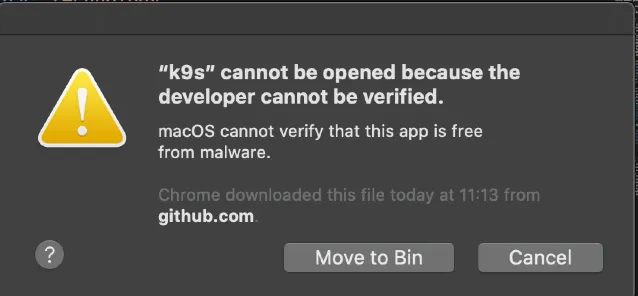
One of the security enhancements introduced in macOS Catalina makes the signing and notarization of 64-bit executables mandatory. Previously this was a recommendation, but now applications that don’t satisfy it won’t execute unless explicitly added as an exception via Security & Privacy in System Preferences.
Although this is a welcome security enhancement — making things safer for end users and preventing the spread of malicious programs — sometimes it prevents you from running an application that you’ve downloaded and trust, without some extra steps.
Two options to get around this are as follows.
1. From the terminal
xattr -d com.apple.quarantine k9sThis removes the quarantine attribute that’s added to the executable when it’s downloaded via a browser. You should be able to run the executable without further warnings.
2. Via System Preferences
Go to System Preferences → Security & Privacy → General. You should see a screen similar to the following:
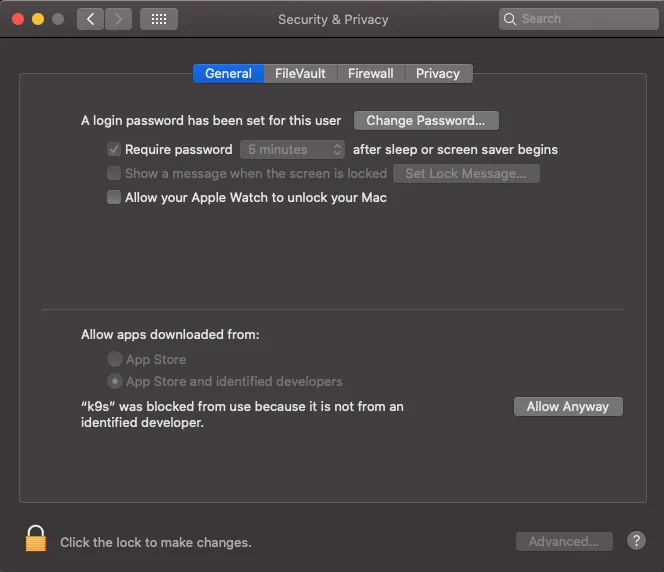
Click the Allow Anyway button next to the application you’re trying to run. You should then be able to execute it without further warnings.
Please note: you should take all care and the necessary precautions when downloading and executing anything from the internet, including the following:
- Ensure you have appropriate anti-virus software installed and up to date.
- Only download software from a trusted and well-known source (over HTTPS!).
- Verify the executable against its published checksum.